Private payments in.
Spending keys stay out.
PPOps PayIn: signed requests, a clear checkout and view-only reconciliation. Run it on your own infrastructure.
0.1.0-beta.3 · releaseSource availability & snapshot →
WHAT IT DOES
Create a private payment request. Let the payer use their own wallet. Know when your backend can accept the payment.
Run the daemon on your infrastructure. Give it a merchant viewing key, never a spending key. Your application creates a payment request; a separate payer sends the funds; PPOps reconciles the received payment and sends an authenticated webhook.
- Interface
- HTTP API + HMAC webhooks
- Current profile
- Arbitrum One / native USDC
- Authority
- View-only. Cannot send or refund funds.
- You provide
- Hosting, RPC/PPOI services and a webhook receiver.
It is not a hosted processor, consumer wallet or payment guarantee. Read the operating limits.
TRY IT LOCALLY
Start with the beta.3 local demo. It runs checkout, reconciliation and webhook delivery on your machine using synthetic settlements. No wallet, RPC or funds are needed.
Requires Node.js 22+ and PPOps v0.1.0-beta.3. These commands do not apply to the earlier beta.1 tag.
# From the beta.3 PPOps source directory
npm ci
npm run demo
Open the local URL printed by the command. Create an order, open its payment request and choose Simulate payment. Return to the shop to see the order fulfilled through its authenticated webhook. Complete demo walkthrough →
- Run a real merchant receiver — initialize,
doctor --offline, preflight, serve,status. - Integrate your backend — HTTP or the TypeScript client, then verify and deduplicate webhooks.
- Run the merchant example — an executable shop, backed by your daemon.
PAYIN / FROM REQUEST TO ACCEPTANCE
The checkout puts the amount and payment status first. It verifies the signed request locally, keeps protocol details under Advanced details and refreshes while the page is open.
- Read the request
- Amount, expiry and signature result. A valid signature is not an endorsement of merchant identity.
- Use your payer
- A locally generated QR, request link or downloaded file. The reference payer checks whether private balance is ready.
- Review and authorize
- Your separate wallet checks the merchant and payment terms, obtains the fee and authorizes spending.
- Follow acceptance
- Payment detected → checking → complete. Partial, late and reversed payments remain visible for review.
Pay privately opens the request handoff; it does not connect a wallet. General consumer-wallet QR support, automatic funding and readiness time estimates are not available.
No trackers, external checkout scripts or remote QR service. The merchant keeps checking even if the payer closes the page.
Read the PayIn guide → · Payment Request v1 · Reference payer readiness
PayIn is the current product. Payout and refunds remain roadmap only, with policy, approval and spending authority kept outside the view-only daemon.
PAYMENT FLOW
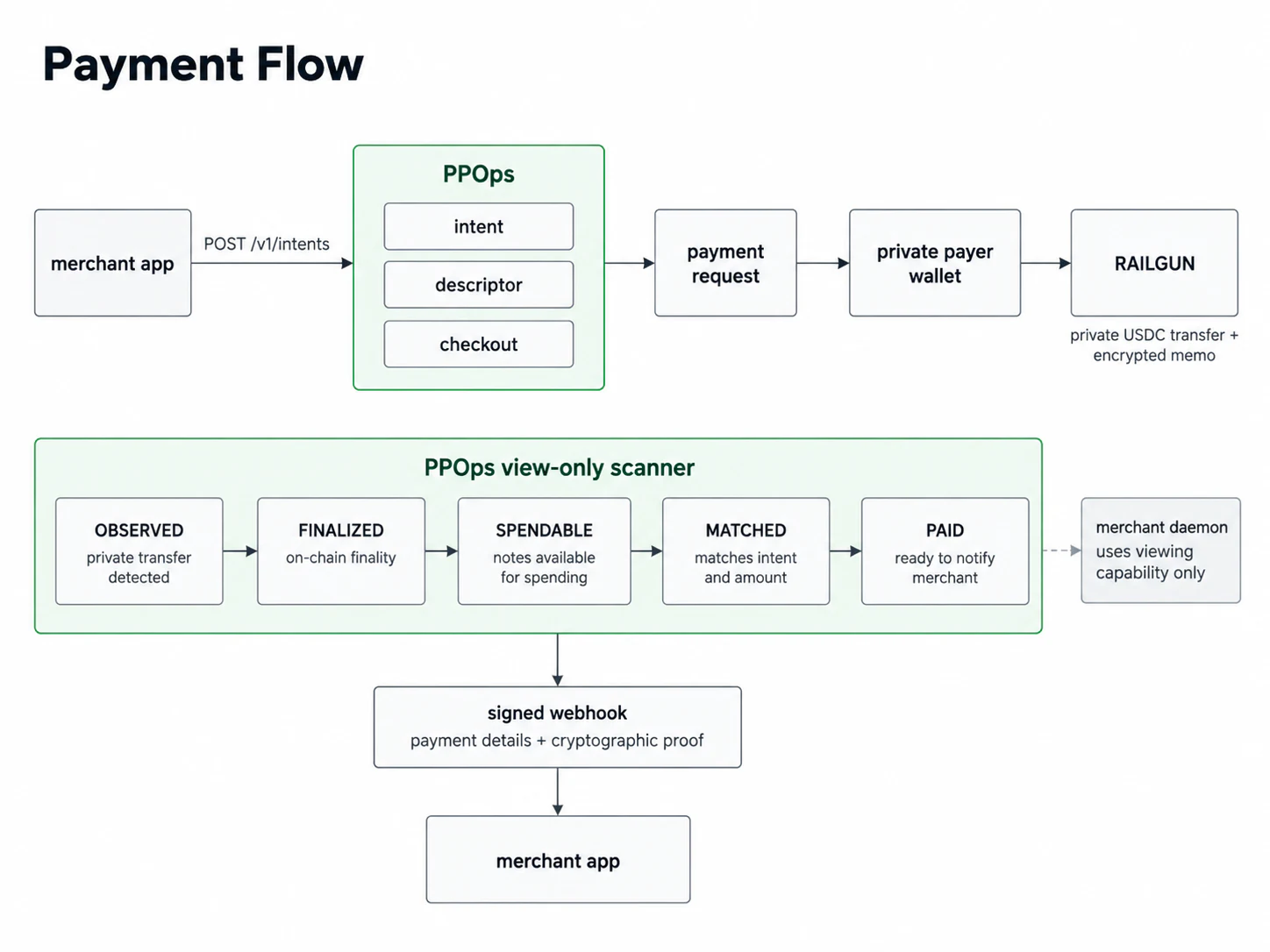
- Your backend creates an intent. Persist the order, amount, expiry and idempotency key; hand the checkout URL to the payer.
- The payer makes a private transfer. Spending material stays on the payer's host, outside PPOps.
- PPOps checks the settlement. It must be finalized, Spendable under PPOI and matched to the intent before its value is credited.
- Your backend decides fulfillment. Verify the webhook, deduplicate durably and apply your partial, late-payment and reversion policy.
credited settlement = FINALIZED + SPENDABLE + MATCHED
observed ≠ paid
Payment states and events · HTTP API · OpenAPI JSON
EVIDENCE
Published evidence: v0.1.0-beta.1. Historical controlled-pilot reports retain their original scope. The current release has its own build, test, SBOM and container records; no new mainnet or external usability pilot is claimed.
| Check | Scope | Result | Artifact |
|---|---|---|---|
| Release verification | Public tag CI completed successfully | PASS | open |
| Primitive gate | View-only discovery, no-spend isolation, restart exact-once | PASS | open |
| Privacy conformance | Eleven redaction, isolation and memo-recovery checks | PASS | open |
| Direct payment / Gate A | Controlled Arbitrum One self-pilot | PASS | open |
| Broadcaster / Gate B | Waku Broadcaster path; controlled self-pilot | PASS | open |
| Mainnet reconciliation | FINALIZED + SPENDABLE + MATCHED → PAID | PASS | open |
| Restart / restore | Stable state, isolated restore, receiver deduplication | PASS | open |
| External operator pilot | Community and external operator trial track | OPEN | open |
KNOWN LIMITATIONS
- v0.1 supports RAILGUN only.
- The current operational profile is Arbitrum One and native USDC.
- The payer needs enough private native USDC already marked Spendable, including the Broadcaster fee.
- A fresh shield may remain ShieldPending while PPOI matures.
- The bundled payer is reference and verification tooling, requiring appropriate technical knowledge to run.
- The QR hands off a signed request URL; automatic consumer-wallet connections and QR compatibility are not validated.
- Payout, refunds and automatic balance preparation are not implemented.
EXTERNAL PILOT OPEN
The external operator track enables third-party merchants and payers to test the pipeline on their own infrastructure using reproducible procedures.
Operators can validate merchant setup, private transfers, restart/restore flows, and webhook deduplication while retaining full control over secrets and infrastructure.
Read the external pilot procedure →
For a non-financial evaluation, check the usability testing protocol.
ARCHITECTURE
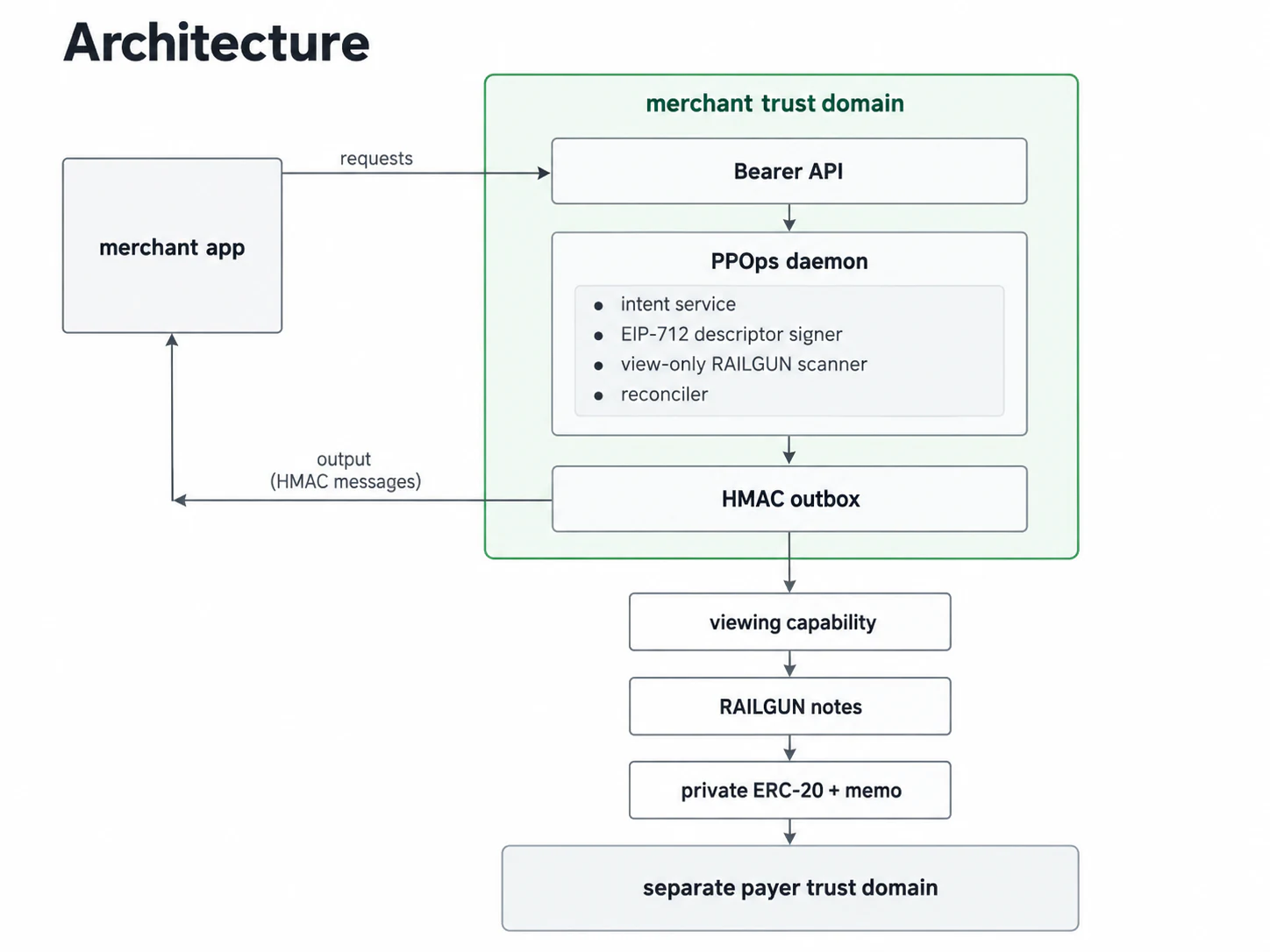
The merchant application owns orders and fulfillment. PPOps owns intents, signed descriptors, view-only scanning, reconciliation and its durable outbox. The payer owns spending authority.
DEPLOYMENT
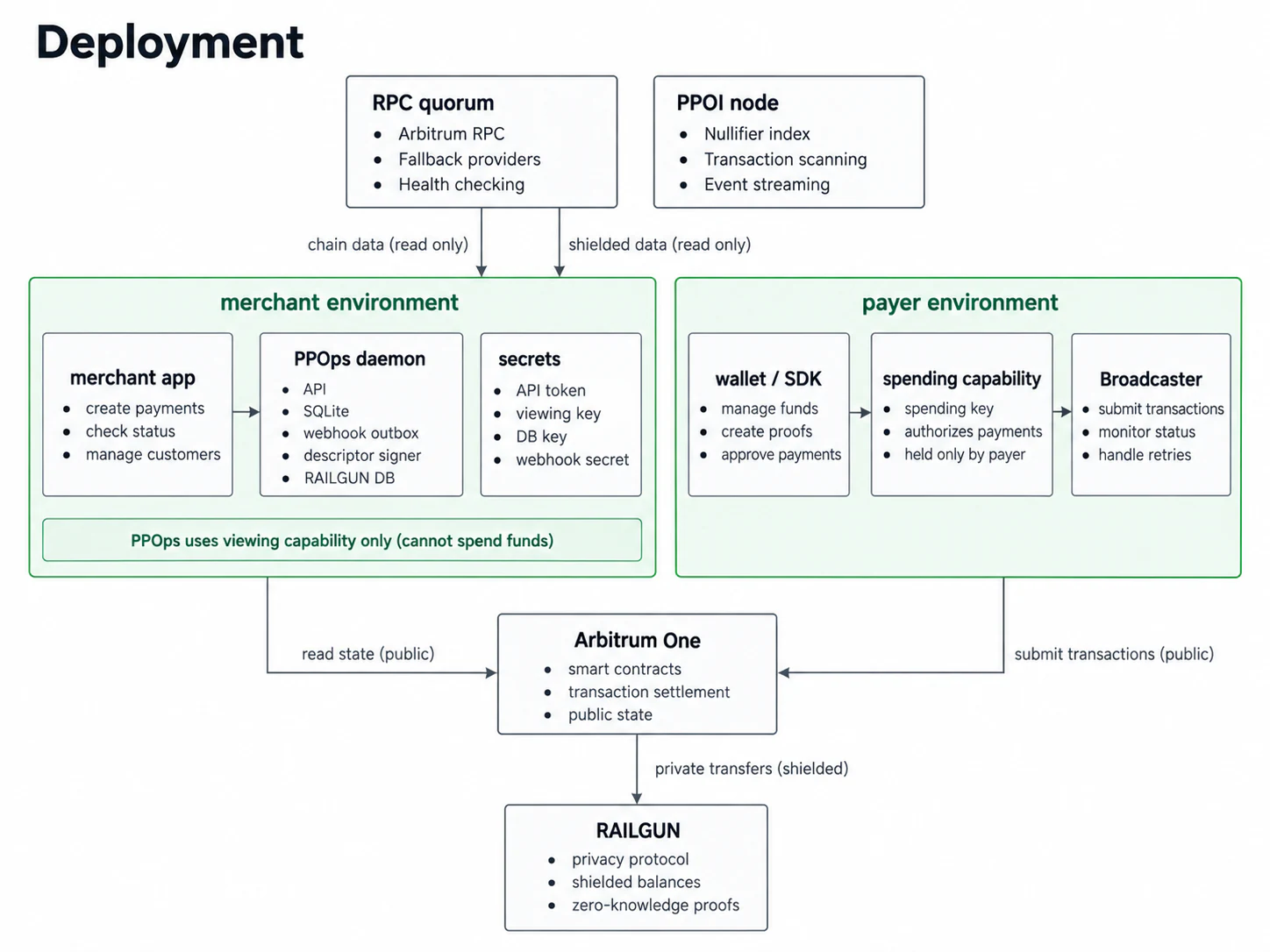
Keep the authenticated API on the merchant's private network. Expose only the documented checkout routes. Store secrets in owner-only files, persist the database and scanner state, and configure independent RPC origins and your chosen PPOI service.
CONTRIBUTING
PPOps is independent, Apache-2.0 open-source software. Reproducible bug reports, clearer documentation, integration feedback and independent evidence are useful contributions.
Repository · Issues · Contributing guide · Agent Skill
Keep secrets, wallet state and identifying payment data out of public reports. Use the security reporting policy for sensitive findings.